Skip to content
BUILT FOR HUMANS + AGENTS
Opportuna
AI AGENTS · PRICING

AI agents that answer to you.

Pick how hands-on you want to be. Each plan uses the AI you already have. Supported consequential actions wait for your approval before they happen.

Opens Cal.com scheduling Privacy (opens in a new window)

TARGET: LIVE IN YOUR FIRST WEEK
WORKING SESSIONS INCLUDED
APPROVAL ON SUPPORTED ACTIONS
SIX JOBS

Examples of work your agents can help with

Start with the one that costs you the most.

Inbox triage

Messages are sorted, routed and drafted for your review.

Follow-ups

Open quotes, leads and invoices get their next touch on schedule.

Scheduling

Calls get booked, confirmed and rescheduled.

CRM updates

Notes, stages and contact details are written up after each call.

Weekly reporting

One report each week, assembled from your systems. On Operator and Managed Team.

Meeting to action

Each meeting ends as a list of owners, dates and drafted messages, ready for your approval.

NEXT / HOW IT STARTS
HOW IT STARTS

Can be live in your first week

For a supported initial workflow, once required access and approvals are in place. Then we review and improve it each week.

  1. 01

    Onboarding

    We walk through your week with you, list the work that repeats, and pick the first job to hand over.

    WEEK 1
  2. 02

    First agent goes live

    Your first agent can be live in the first week once access, approvals, and the initial workflow are ready. Supported actions it prepares wait for your approval.

    FIRST WEEK
  3. 03

    Working sessions on a regular rhythm

    Up to two sessions per billing period on Operator, one per week on Managed Team, to build or improve skills and tune what's running.

    ONGOING
ONE WEEK

One week, start to finish.

MONDAY

You describe what keeps slipping.

TUESDAY

Work begins on the first agent.

WEDNESDAY

Supported actions waiting for your approval.

THURSDAY

What it was unsure about, flagged for you.

FRIDAY

The week's report, on Operator and Managed Team.

NEXT / WHAT YOU GET
WHAT YOU GET

What's included.

A weekly report

Assembled from your own systems, so you don't have to write it. On Operator and Managed Team.

Access and approvals scoped to you

Access, approvals, and data routing are scoped to your engagement.

Approval before agents act

Supported consequential actions wait for your approval before they happen.

NEXT / PRICING
PRICING

Pricing

Operator

$2,000/ MONTH

Opens Cal.com scheduling Privacy

Managed Team

$5,000/ MONTH

Opens Cal.com scheduling Privacy

Model
Self-serve
Done with you
Done for you
Best for
Trying one AI agent on your own
Owners who build with us
Owners who want it handled
Getting started
Join the early list
Fit-check, then onboarding
Working sessions
None
Two 45-minute sessions per cycle
One 45-minute session a week
Skill building
None
In your working sessions
In your weekly sessions
Who runs your agents daily
You
You, with our help
We do, with a named lead
Your private client hub
No
Yes, plus a weekly report
Initial human reply
No
Within 6 business hours
Within 4 business hours
#breakglass initial replySupport targets and business hours
No
Within 4 business hours
Within 2 business hours
Approval before agents act
Yes, on supported actions
Quarterly business review
No
Available as an add-on
Included

Free

$0
Model
Self-serve
Best for
Trying one AI agent on your own
Getting started
Join the early list
Working sessions
None
Skill building
None
Who runs your agents daily
You
Your private client hub
No
Initial human reply
No
#breakglass initial replySupport targets and business hours
No
Approval before agents act
Yes, on supported actions
Quarterly business review
No

Operator

$2,000/ MONTH

Opens Cal.com scheduling Privacy

Model
Done with you
Best for
Owners who build with us
Getting started
Fit-check, then onboarding
Working sessions
Two 45-minute sessions per cycle
Skill building
In your working sessions
Who runs your agents daily
You, with our help
Your private client hub
Yes, plus a weekly report
Initial human reply
Within 6 business hours
#breakglass initial replySupport targets and business hours
Within 4 business hours
Approval before agents act
Yes, on supported actions
Quarterly business review
Available as an add-on

Managed Team

$5,000/ MONTH

Opens Cal.com scheduling Privacy

Model
Done for you
Best for
Owners who want it handled
Getting started
Fit-check, then onboarding
Working sessions
One 45-minute session a week
Skill building
In your weekly sessions
Who runs your agents daily
We do, with a named lead
Your private client hub
Yes, plus a weekly report
Initial human reply
Within 4 business hours
#breakglass initial replySupport targets and business hours
Within 2 business hours
Approval before agents act
Yes, on supported actions
Quarterly business review
Included

What is a skill?A skill is a playbook your AI follows for one job, the same way each time. Skills, playbooks and records we build with you are yours to keep. Your client hub is securely managed by Opportuna. Your content and delivered materials remain portable under our Terms.

Larger team or special needs? Ask about Enterprise.

Enterprise terms are set out in your order form.

NEXT / TRUST
TRUST

How your access and your data are handled.

CONFIGURATION

How each deployment is configured

Access, approvals, and data routing are scoped to your engagement.

CREDENTIALS

Credentials are not sent over email or chat

Access is granted through your own systems. We don't ask for passwords to your personal AI apps.

APPROVAL

Approval

Supported consequential actions wait for your approval before they happen.

CONTROL

Pausing

We can pause a supported AI agent at your request.

NEXT / SEE IT WORK
SEE IT WORK

See it work.

In the demonstration below, jobs land in a review queue, and supported actions wait for approval before they go out.

SHOWN IN A DEMONSTRATION ENVIRONMENT

All names and numbers in it are invented.

01

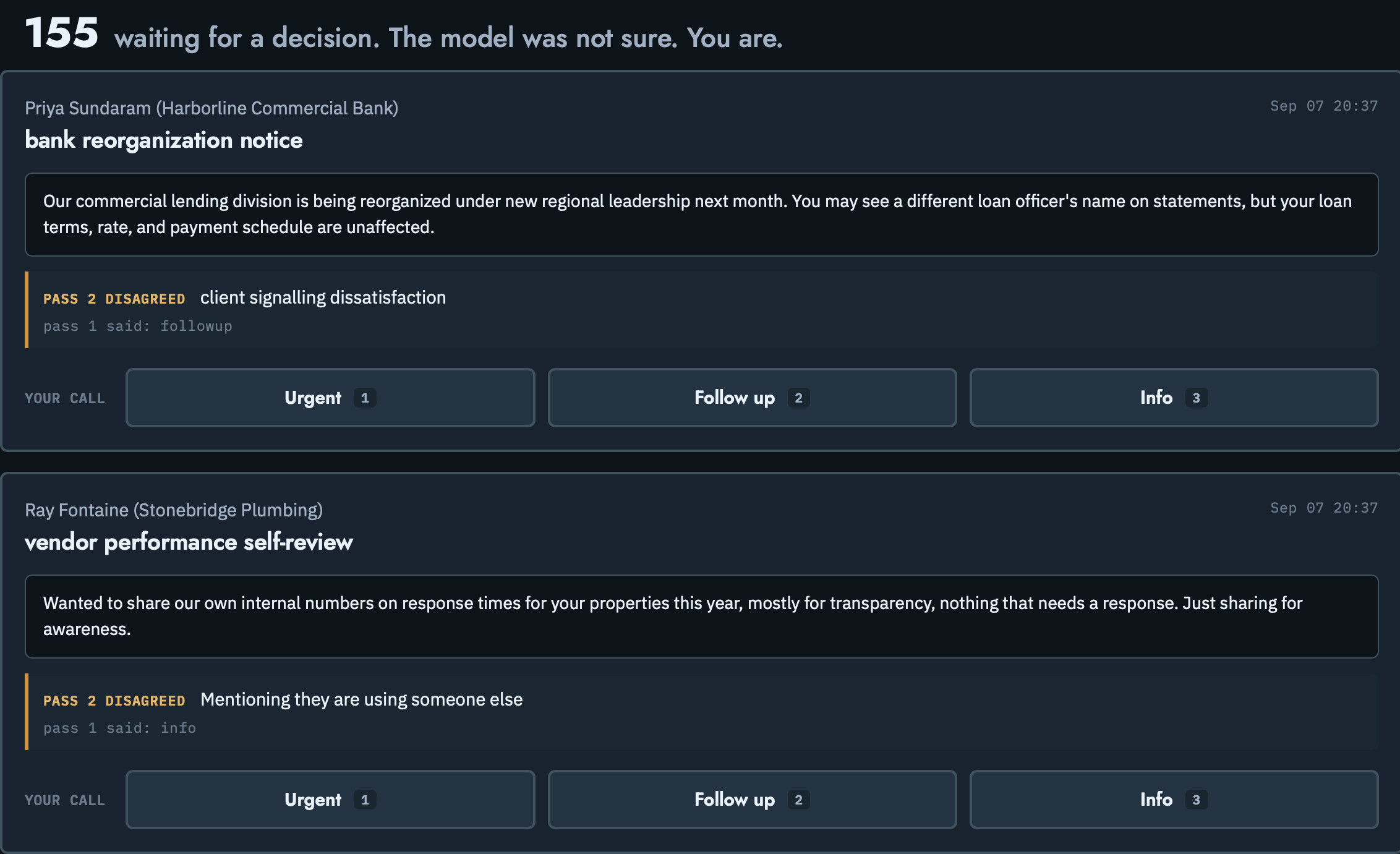
The review queue

When an agent prepares a supported consequential action, it waits here with the agent's reasoning, so you approve or decline it before it happens.

APPROVE, EDIT, OR REJECT ON EACH ROW
THE REVIEW QUEUE
The review queue: messages awaiting a decision, each with Urgent, Follow up, and Info controls.
02

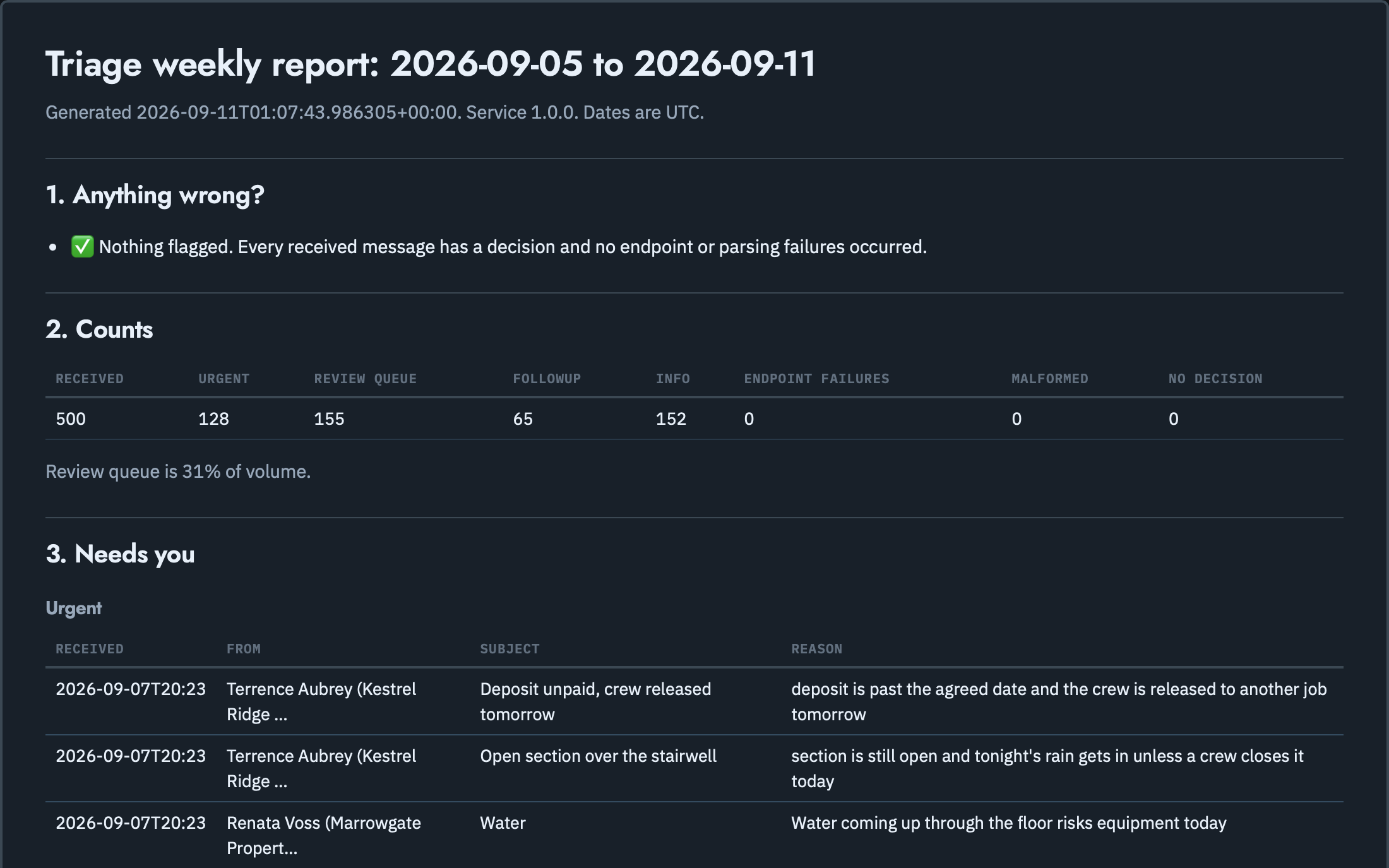
The weekly report

One page showing what came in, what needed a decision, and what still needs a look. Included on Operator and Managed Team.

COUNTS PULLED STRAIGHT FROM YOUR OWN SYSTEMS
THE WEEKLY REPORT
The weekly report: counts for the week and the items that need the owner.
03

The delegate box · coming soon

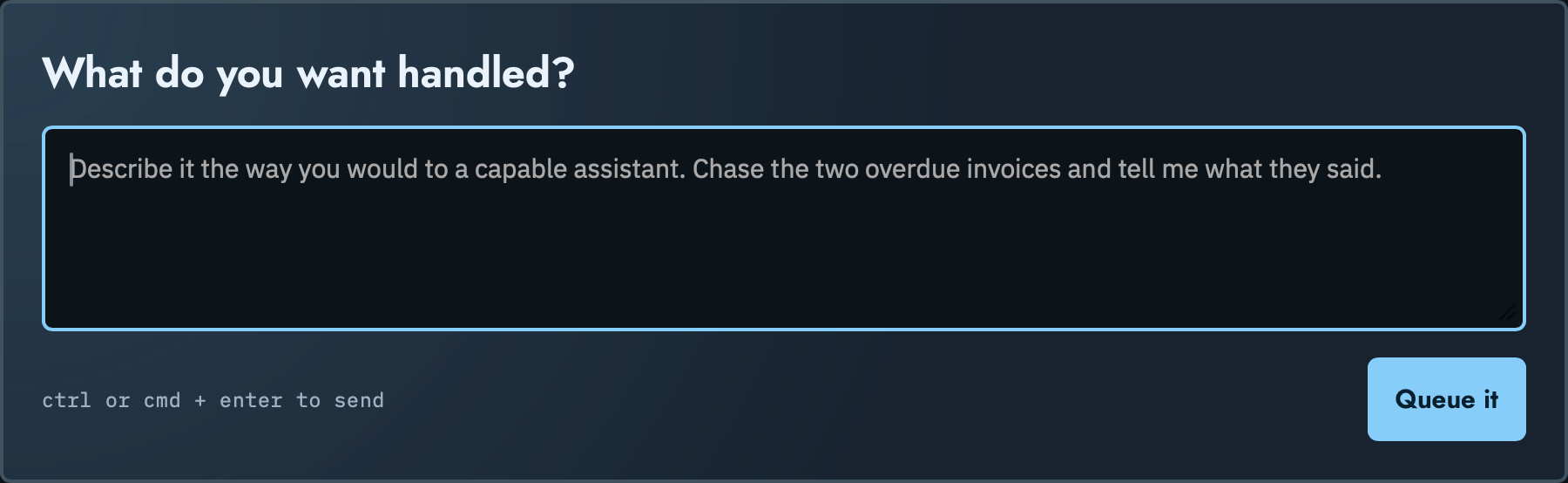
Coming soon. The delegate box: describe a job in one sentence and it becomes a standing task an agent runs.

ONE SENTENCE IN, A STANDING JOB OUT
THE DELEGATE BOX
The delegate box: a plain-English request typed into a field, ready to queue.
NEXT / FAQ

FAQ

Which AI do you work with?

The one you already use: ChatGPT, Claude, Gemini and others. If you don't use one yet, we'll help you choose. Your connected AI and software accounts stay under their own terms, pricing, availability and usage limits.

Do I need to be technical?

No. If you can describe the job, we can build it with you.

What do I keep?

The skills, playbooks, and records we build with you. They're yours to keep, as set out in our Terms.

What happens to my data?

Your information stays tied to your business. Please don't share patient health information or client account numbers; we don't accept them yet.

What counts as #breakglass?

An active security concern, unauthorized access, a serious outage, or an AI agent action causing harm. It isn't for questions, training or ordinary bugs. We aim for an initial human reply within 4 business hours on Operator and 2 on Managed Team, for triage, not a guaranteed fix.

What happens on the fit-check?

You bring one job that eats your week. We tell you honestly whether it's a fit and what your first AI agent would do.

NEXT / THE NEXT STEP
THE NEXT STEP

Hand over the work that keeps falling through the cracks.

Fifteen minutes. Tell us what keeps slipping, and we'll show you what comes off your desk first.

Opens Cal.com scheduling Privacy (opens in a new window)
An operator at his desk, reviewing work on screen.
Photo by Guillaume Issaly on Unsplash